Microsoft Dynamics GP, formerly known as Great Plains, has been a trusted ERP solution for many businesses over the years. However, if your business has evolved over time, you may find that you have outgrown the capabilities of Great Plains or Dynamics GP.
In reviewing your current Great Plains system, you may be asking yourself,
“Should I stay or should I go?”
Before we help you answer that question, you should first read Microsoft’s official announcement about “End of Support” for Great Plains (GP) and review the projected, end-of-life product support time-frame for GP below:
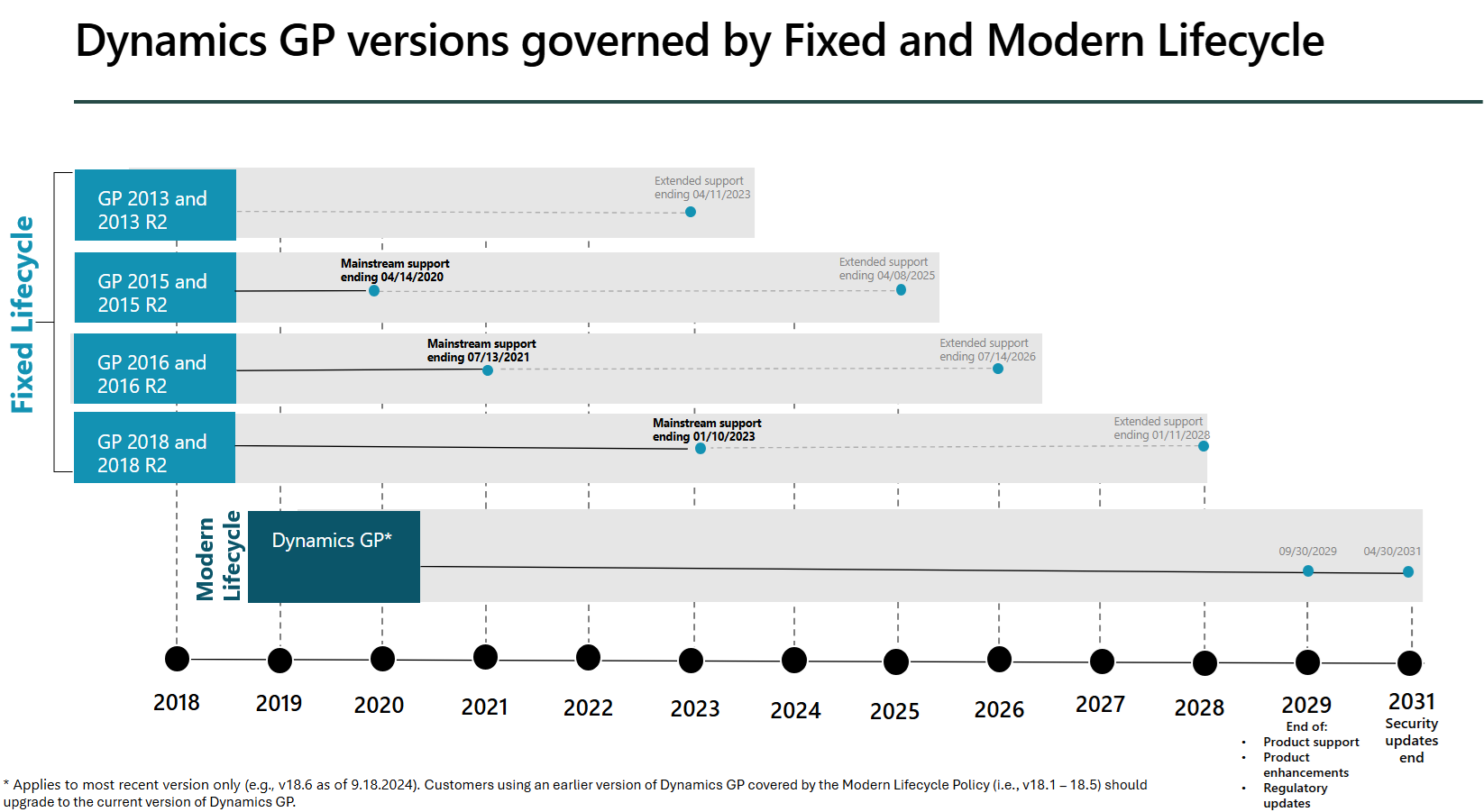
As you can see, it’s 5-6 years before GP support officially ends, which is just enough time that you could consider optimizing GP, but you must also start thinking about what to do and where to go after that!
Good news: Microsoft Dynamics 365 Business Central is the natural successor to Great Plains, built on a strong, modern platform, which incorporates much of what made GP so great in the past!
Microsoft Business Central or “BC” is a robust, all-in-one business management solution designed to help companies break down data silos and manage their business more efficiently. BC is built on the robust, proven, dimensional database architecture of Dynamics NAV and incorporates many of best features Great Plains/Dynamics GP offered, which grew a loyal fan-base over the years.
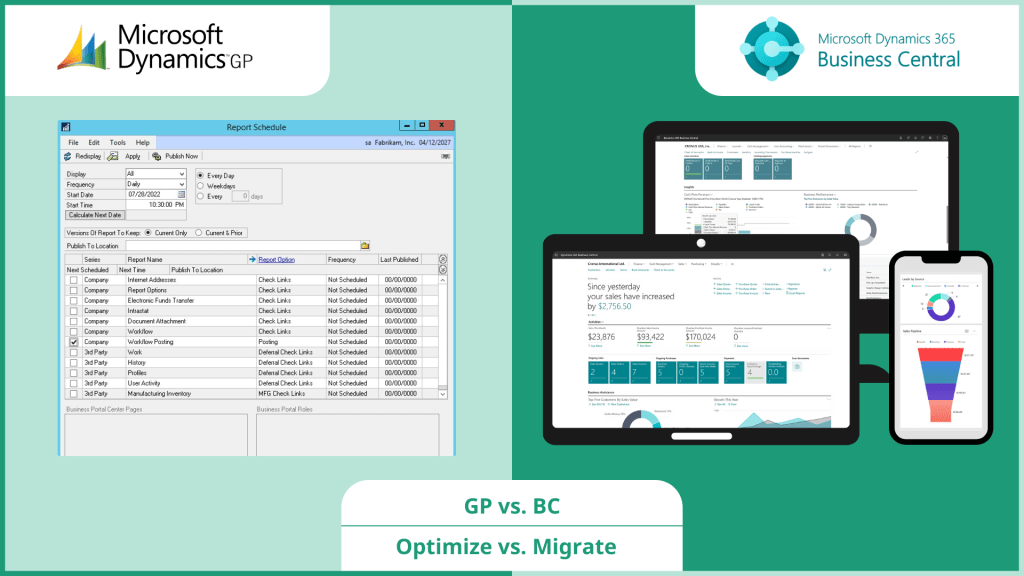
In this post, we will discuss the key considerations and steps for migrating within the Microsoft product family from Great Plains to Business Central, starting with a careful review of your current system…
MIGRATION REVIEW PROCESS
1. Assess Your Current System:
Before beginning the migration process, it’s essential to assess your current Great Plains system to identify any customizations, integrations, and data that need to be migrated. This will help you understand the scope of the project and ensure a smooth transition.
2. Choose the Right Partner:
Selecting the right implementation partner is crucial for a successful migration. Look for a partner with experience in both Great Plains and Business Central, as well as a proven track record of successful migrations. Your implementation partner should be able to provide you with a detailed project plan, timeline, and budget.
3. Data Migration or Archive Mode:
Data Migration is one of the most critical steps in moving to a new system. You’ll need to map your data fields from Great Plains to Business Central and ensure that all data is accurately transferred. This includes master records, transactions, and historical data.
However, when reviewing your company’s data, generated over years by one or more systems, with a strong probability of less than 100% data quality, you may wonder if there is an alternative approach… Yes, there is another way to migrate — Archive Mode!
Archive Mode is sometimes referred to as an “opening balances” migration. In the case of moving from Great Plains to Business Central, we launch your new system with a clean set of master data and opening balances. Historical data moves into an archive for ongoing auditing, reporting, and compliance with legal business records retention requirements.
Our most highly recommended Archive Mode migration involves moving all legacy historical data to a standalone SQL database, and using Power BI for reporting across both Great Plains history and post-migration data in Business Central.
4. Customizations & Integrations:
Identify any customizations and integrations in your Great Plains system that need to be replicated in Business Central. This may include custom reports, workflows, or third-party integrations. Your implementation partner should be able to help you assess the feasibility of replicating these customizations and integrations in Business Central.
In recent years, we have seen most organizations evolving their business processes to more of a best practices model, in which replication of customizations and overall modifications to the underlying code are reduced, for simplicity and improved efficiency.
5. Training:
Business Central has a different user interface and feature set than Great Plains, so it’s essential to provide training to your users. Your implementation partner will provide training and support to ensure a smooth transition for your users.
6. Go-Live & Post-Go-Live Support:
Once you’ve completed the migration and testing, it’s time to go live. Your implementation partner should provide post-go-live support to ensure a smooth transition and address any issues that arise.
FAQs:
Q: Can I migrate customizations and integrations from Great Plains to Business Central?
A: Yes, with the help of an experienced implementation partner, you can assess the feasibility of replicating customizations and integrations in Business Central.
Q: How long does it take to migrate from Great Plains to Business Central?
A: The timeline for migration can vary depending on the complexity of your system and the scope of the project. Your implementation partner should provide you with a detailed project plan and timeline.
Q: Do I need to provide training to my users when migrating to Business Central?
A: Yes, Business Central has a different user interface and features than Great Plains, so it’s essential to provide training to your users to ensure a smooth transition.
Q: Can I access Business Central from anywhere?
A: Yes, Business Central is a cloud-based solution, so you can access it from anywhere with an internet connection.
Q: Can I still use Great Plains after migrating to Business Central?
A: No, once you’ve migrated to Business Central, you will no longer be able to use Great Plains. However, as described above in section 3. Data Migration vs. Archive Mode, you have two options for historical data from Great Plains:
- Migrate all or part of your history into Business Central for ongoing access (a big project), or
- Move your history into a standalone SQL database with reporting tools which joins both historical and new data (a small project).
Next Steps:
Migrating from Great Plains to Business Central can be a complex process, but with the right planning and execution, it can provide significant benefits for your business. By assessing your current system, choosing the right implementation partner, and following a structured migration process, you can ensure a successful transition to Business Central. With its powerful features and scalability, Business Central can help your business streamline processes, improve efficiency, and drive growth.



 CKS // Cloud Solutions
Leave a reply to Microsoft GP to BC: Plastics & Process Manufacturing – CKS // Cloud Solutions > Blog Cancel reply